
Claude Imagine / Practical guides
How to Paste Images into Claude Code
To paste an image into Claude Code, copy the picture, focus the prompt, and use your terminal’s shortcut. Check for an image attachment before sending your question.
WSL also supports Ctrl+V. If your terminal intercepts it, use Alt+V. No attachment? Find a fix · Official shortcut reference
Documentation checked September 8, 2026
How to paste an image in Claude Code
- Copy the picture. Copy an image from an image viewer or capture a screenshot to your clipboard. A web address or filename supplies text, not the picture's contents.
- Focus the Claude Code prompt. Click inside your running session and use the image-paste shortcut for your terminal.
- Confirm the attachment. Look for an
[Image #N]chip in the prompt, as described in the current official reference. Then type your question and send it.
Start with a question whose answer you can check:
Describe the layout and visible text in this screenshot.If you're debugging a page, include the problem you want investigated. A screenshot shows the appearance; it doesn't tell Claude which spacing, text, or interaction you intended to change.
Claude Code terminal: image paste shortcuts
| Environment | Image-paste shortcut | What to check |
|---|---|---|
| macOS or Linux terminal | Ctrl+V | Focus the Claude Code prompt, rather than the shell or an editor. |
| iTerm2 on macOS | Cmd+V is also listed | Use the current Claude Code reference instead of assuming every Mac terminal behaves alike. |
| Windows | Alt+V | Check for an image attachment, rather than relying on ordinary text paste. |
| WSL | Ctrl+V or Alt+V | The reference lists both bindings; use Alt+V when the terminal intercepts Ctrl+V. |
This table follows the official reference checked on September 8, 2026. The worked example below tests file input on macOS. It isn't a claim that we tested clipboard behavior in every terminal listed here.
Try a reference image
Use this small test image to separate an input problem from a difficult visual question. It contains three colored shapes and two lines of text.
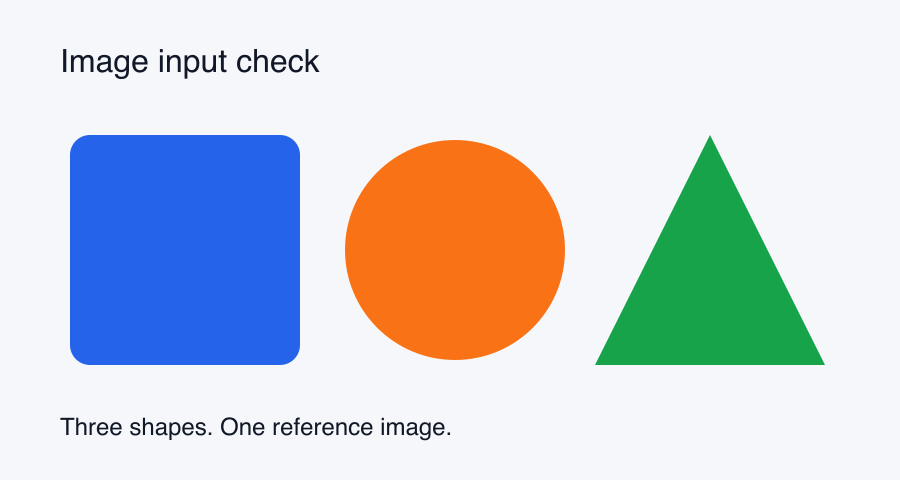
Open and save the reference PNG. Put it in your working folder as reference.png, then ask:
Read ./reference.png. List the three shapes from left to right,
their colors, and the heading. Do not modify files.
On September 8, 2026, we tested this 900 × 480 PNG with Claude Code 2.1.263 on macOS, using its print mode and Read tool. It identified the heading as “Image input check,” followed by a blue rounded square, an orange circle, and a green triangle. It also read the caption, “Three shapes. One reference image.”
That verifies the saved-file route for this sample. To check clipboard input in your own terminal, copy the same picture from an image viewer and ask the same question after the attachment appears. Matching answers give you a simple check that Claude received the intended picture.
Use a saved image when clipboard paste fails
Anthropic's image workflow documents three ways to add an image: drag and drop, clipboard paste, or an image path. A saved file gives you a route that doesn't depend on clipboard shortcuts.
Save the picture somewhere the Claude Code session can read. Use a relative path when it's inside the working folder, or provide its full path. If dragging a file inserts a path instead of an attachment, ask Claude to read that path explicitly.
Read ./reference.png and describe its contents before suggesting changes.For SSH, containers, or another remote environment, the file needs to be accessible where Claude Code runs. A path on your laptop doesn't automatically point to a file on the remote machine. Transfer the image through your usual file-transfer workflow, then reference its location there.
Can't paste images in Claude Code? Try these fixes
Pasting inserts text or a URL
Check what you copied. A browser's “copy link” action copies an address. Open the picture in an image viewer and copy the image, or save it and use the file-path method. Don't keep changing your prompt while the input is still text.
No image attachment appears
Check that the Claude Code prompt has focus and that you're using the binding listed for your terminal. Allow the attachment to finish loading before sending. If nothing appears, try the reference PNG as a saved file. This checks whether file input works independently of the clipboard.
The shortcut is intercepted in WSL
The current official reference explicitly lists Alt+V as an alternative when the terminal intercepts Ctrl+V. Try that binding in the Claude Code prompt. If it still doesn't attach the picture, use a file that is accessible from the WSL session.
Claude cannot find the image
Check the filename, the current working folder, and whether the file lives on the machine running Claude Code. Ask it to read the exact path. A local file path and a remote file path are different locations, even if their filenames match.
Use the image as context for your next task
Once the input works, make the requested action specific. For a UI screenshot, ask which elements differ from the design. For a generated image, ask whether the text, colors, or composition match your brief. Keep the source files available when you want Claude to make code changes.
Sending a lot of screenshots at once? The Claude image upload limit guide covers the 20-per-message cap in claude.ai and the 2000 px rule for requests with more than 20 images.
Image input is part of Claude Code's native workflow. You don't need an image-generation MCP server just to have it read a picture. If your next task is creating new visual assets, our Claude Code image generation guide explains the connected-tool setup. The MCP setup guide covers connecting Claude Imagine.
Claude Imagine publishes this guide and provides an independent image-generation service. It isn't affiliated with Anthropic. The clipboard instructions above come from the linked Claude Code documentation.
Questions about images in Claude Code
How do I know the image was attached?
The current Claude Code reference describes an [Image #N] chip in the prompt. Wait for the attachment before submitting, then ask a question about the image's visible contents to check that it received the picture you intended.
Can I use a file path instead of pasting?
Yes. Save the image somewhere Claude Code can read and ask it to open that path. In a remote session, the image must be accessible on the machine running Claude Code.
Does pasting an image require an image-generation MCP server?
No. Reading images is part of Claude Code's native workflow. An image-generation service is a separate tool for creating new pictures, rather than supplying an existing image as context.
Why does the shortcut differ between terminals?
Terminals can intercept or map key combinations differently. The current reference lists Ctrl+V, Cmd+V in iTerm2, and Alt+V on Windows and WSL. In WSL, Alt+V is the documented alternative when the terminal intercepts Ctrl+V.